Introduction to Modern AI
I have never seen such a lively course before. I have seen LinkedIn course trying hard to be lively but they often come off as creepy. This is proper lively.
AI, Machine Learning & Models
- AI: The science and engineering of making intelligent machines - John McCarthy
- Intelligence: The computational part of the ability to achieve goals in the world.
- Mechanical Task: The machine doesn't have to figure out how to achieve something, it gets it al.
- Fewer Rules: Easier, More rules: Harder.
-
AI Symbolic AI Machine learning (rules based) (based on statistics: learn from data an examples) - Machine learning is a sub-field of AI.
- Machine Learning is the study of algorithms that allow computer programs to automatically improve through experience.
- Model: Is a function meaning that it takes in input, does something to process that input and produces some output.
Model learns to change how it processes the input to change hte output. - Models have parameters that can be adjusted.
- In ML, inputs are called features.
- AI is collection of many kinds of models, for example: Structured Data, Computer Data, Automatic Speech Recognition, Audio Generation, Natural Language Processing(both the audio ones before).
- Neural Network: Performs really well when it can learn with a lot of data.
- Neuron is a fundamental unit for Neural Network.
Neuron contains weights(parameters).
Weight word is specific for Neural Networks.
Layer are many neurons in one group.
Deep Learning is also Deep Learning. -
Training phase
input → model → output → (Comparison with correct answer) → Performance measure → Optimizer
Inference phase→ When the training is complete, a user can use that model in the inference phase only.input → model → output -
The Big Picture:
- AI is a field of research that seeks to enable computers to perform tasks intelligently.
- Machine learning is a major sub-field of AI that uses data to train computers to perform tasks.
- A model is a function that performs a task by taking an input and producing an output, and can learn from experience and data to get better at that task.
-
If you get stuck: Keep moving forward and see the whole course first and then get back to the course.
Give yourself permission to move forward and come back later.
Computer Vision
- Object Detection
- One common task in computer vision is to identify a sub-section of an image.
- Object Localization: Bounding boxes in the region of image which is an object. It's rectangle only.
It doesn't tell you what an object it only where it is. - Image Classification: It doesn't define the region but just classification
- Object Detection: Object Localization + Image Classification
- Specificity: How specific the image classification is.
- Camera angle of the image also matters a lot. Similarity Search:
- Searching images with similar embeddings(type of features represented by a number). Image Segmentation
- Mask: Image of 0 and 1 or an object or not.
- Background blur doesn't blur only the background but blurs everything then places the segmented clear image of the object and overlaps it onto it.
Why?
Blurring effect might not be pixel perfect and can accidentally blur the object itself.
Optical Character Recognition
- OCR is object detection. Take a Break
- Incubation Theory:
- Unconscious thoughts: Time spent day dreaming helps with the tasks.
- Remote association: Brain making connections.
- Rest and Recovery: Brain recovers.
- Selective Forgetting: Free up your brain to chose a different path than the last dead-end task.
- Preparation: Try to solve the problem.
- Incubation: Taking a break: Switching to a different task that frees your mind enough to day dream which includes exercise, sleeping.
- Illumination.
- Verification.
- Incubation Steps:
Machine Translation
-
Words and Word Order
- Different word: Same spelling and pronunciations: homonyms
- Different words: Same spelling but pronunciation may or may not be same: homographs
- Word order varies between languages. Also, pronouns can be dropped in few languages and is called pro-drop language. Context
-
Languages have formal vs. informal versions.
Asking Google Translate to use formal instead of informal: adding the formal word already translated in the text to be translated followed by [formal] and also capitalizing where necessary gives it context. - Experiments with machine translation models. Idiomatic vs. Literals
- Even adding a period at the end of an idiom can change it's behaviour. It might not always work like this but it's worth seeing. Distance between two words
- Distance between words also matter. For example a normal sounding train of sentence if broken my let's say a large monologue, the machine translation can forget let's say the gender of the object(like in Spanish).
Google Translate defaults to masculine if unsure. - Co-reference Resolution: Deciding when two pieces of text are referring to the same thing.
Chatbots Overview
-
What you can do with Chatbots
- Did you know that if you eat a salad every time you would otherwise eat a piece of cake, you might see about a 10% reduction in how much you enjoy your life.
- Input (Prompt) → Chatbot → Output(Completion(response))
-
- Expand: Ask a simple question or asking for ideas.(Expand on what you asked)
- Synthesize: Summarize or label text. (A lot of info in-> Synthesize into smaller)
- Transform: For example Translation, reword, revise.
- Evaluate: Fact checking, marking and more.
- Chat
- Take Actions: Set calendar events or connect with other software.
- Input images and Text
Predict the Next Word
- Asking a chatbot to give answer first and then reasoning second produces a wrong answer. Ask it to give reasoning first and then answer.
- The reason for that is ChatBots work my predicting the next word.
- Early versions of chatbots just completed and hence it's called completions.
- Early Chatbots take the whole previous input+last output and then predicts the next prompt. That's why it's called a prediction engine.
- The reasoning will go wrong in order to justify the answer given already, that's why asking for reasoning first is better approach as this is all just a prediction engine.
-
Prompting Tip: If some tasks help the chatbot perform another task, as it to do those helpful tasks beforehand.
e.g. give reasoning first, then your answer. Or, review what you know about this topic, write an outline, then write an article. -
In NLP, Task of predicting next word is called language modelling.
Model a language→ Iteratively predict the next word in a piece of text and make it sound like human produced text. - When given a large set of models wth lot of text data, the language can not only predict the next word but also do other tasks.
- Instructions are included with the input which is directing or prompting the models, that's why inputs are called prompts. Hallucinations
- MLM and ChatBots tries to answer something that's not right and makes it up, it's called hallucinations.
- Also, if the chatbot is deflecting and talking about something else, it also comes under hallucinations.
- Be very careful which time/date is the language model data is from.
- LLMs have some randomness built in and will not pick the most probable word every time.
- It is easier to notice a chatbot hallucinating when you know about the topic well and the topic is something the chatbot has little idea about. Memory
- Previous questions or memory influence the next answer where if the chatbot doesn't know what the answer is it will make up answers from the earlier chats.
- This is the reason you should start a new conversation anytime there is a new topic and turn memory off
- Memory is different from LLM.
Memory is specific to users but the LLM is same for all.
Level of Difficulty
- When translating between less popular languages, it's better to translate first to english then the other language simply because the ChatBot has a lot of data on english language. Use Multiple Chatbots
- Instead of relying on just one chatbots, use a lot of them.
- The amount of RAM on your system decides how large LLM you can run on your system.
- LMStudio hosts the compressed version of large LLMs to run on your own system.
- Use offline models for privacy reasons.
- LLMs have different behaviour and personal preferences. Test it Before you Rely on it
- Always confirm if a chatbot is giving accurate results before starting to chat with it.
- Give a smaller version of the task to the chatbot to perform that you can easily check as a test. How to Write your Prompts
- You can prompt in your own language. Certain models have certain level of understanding of these languages.
- Write more text than you normally do for web searching.
- Think more about what exactly you want and even what you plan to do with the information also.
- Break down your tasks into a sequence of sub-tasks by telling it follow a list of subtasks to do. Also attach references.
- Attach references before the steps.
- Whatever thing needs to happen before for the later thing should come first. Your prompt should be chronological as stated before.
- Also ask in the way you want an answer.
- "Please provide thorough answers when you are confident of the information. If you're not confident in answering parts of the question, add a note to the section such as "I am not 100% sure"" is a great line to add as the chatbots tend to answer wrong confidently.
- Add structures to your prompts such with sub-headers(followed by :) with references: and steps: and bullet points with( *) and numbered list also.
Put special characters around around links(use """ or ### at start and end if unsure called delimiters) or special texts that should be treated differently.
Note: Also enable Web Scraper Functionality in the chatbot if possible. - Some chatbots allow you to highlight parts of the output to see where the actual reference is coming from like cohere.
- You can give chatbots a temporary persona like a veterinarian before starting a chat.
- Sometimes if persona isn't enough, you can explicitly define how and what you want.
- Few shot Prompting: To get similar type of response out, you can give an example first. Also asks for many options.
Also add a bit more instruction along with few shot prompting like study these and give examples and then answer these, the question.
Silver Linings
- "Every cloud has a silver lining"
- Emotional Validation when someone is sad: Allow them to feel those emotions first. Sad, stressed, angry, scared. This time is important to let them know it's okay to feel these emotions.
- Toxic Positivity: Attempting to get someone to think positive without first thinking negative.
Alternative is try and fix thing like: "You're better off this way,"You should appreciate everything you have,""Look on the bright side". These words don't allow the person to first feel the emotions he needs to feel and doesn't let you know you acknowledge the issue.
Ways to use Chatbots
-
Expand: Answer Questions
- Explicit instructions and use more structure with series of sub-text below the questions.
- Add follow-up instructions/questions.
- If you ask a chatbot to do too many things at once, it may not do so that well, however, dividing the task in parts will help the chatbot.
- Reflection: Ask the ChatBot to review it's own work but in detail.
- Since Chatbots work on next word prediction, they can't go back and change what they already said. Reflection helps here.
-
For each bullet point, use key value pairs
is one way of reflections.
where the key is the original quote from your previous writing, and the value is your clarification or addition. - Expand on the sub-topic to get more details on it.
- Fill in the blanks. And also, encourage the chatbot to give multiple answers through your prompts(plural instead of singular).
- Clarify: This is where it's better than search engines.
- Try out the same prompt on multiple chatbots. Expand: Generating Ideas
- Ask for multiple options.
- You can ask chatbot to analyze, explain, then suggest.
- You can ask a chatbot to daydream which is using hallucinations to your advantage. This is where the chatbot isn't sure so it makes stuff up which might be useful in some case. Synthesize: Summarize Text
- Ask chatbot to summarize from a web link using NotebookLM or such chatbots. This shows references also.
Doing so really helps you focus on things you want to research about. You can leverage this to increase your own research. - Using "summarize" will make the chatbot answer in it's own words.
Instead of summarize ask it to, "From the following link, extract relevant text as direct quotes." - Sometimes chatbots decline to do so and some can't extract text and some can't even work with a web link which is dangerous as it will still produce garbled information instead of saying it can't access the link.
- You can of course download and upload the file as document and the prompt now becomes,
From the following attached document, extract relevant text as direct quotes.
- It's always good to double check.
- Chatbots have context limit which is how much text it can take at a time so try removing extra stuff from a document if the context limit is reached or ask in parts if it's a code.
- Chatbots can identify related topics which is different from standard software.
- Put source text if you can't attach it like this:
``` [source text] ``` From the provided text above, extract all the relevant text as direct quotes related to ... - If you need privacy, work with a downloadable model instead. Synthesize: Label
- Synthesize discussions in a forum like a reddit post or stack overflow.
- In case the chatbot fails to reply as it is not sure, you can still ask it for a rough estimate.
- You can ask a chatbot to label each piece of information into something.
- An intermediate step which can be saved as a new piece of information is really useful for a chatbot to work.
-
It's better to put the task before and after the prompt, yes, two times. LLM does better this way.
"Lost in the middle" research paper.
Primacy and recency effect: Human brains remembers the first and last stuff better than the middle. Similarly with ChatGPT.Task ``` source ``` task
Note: This doesn't make big difference in more complicated tasks over many documents. - For most chatbots just use the task at the beginning and the task after that and put source around with delimiters. Transform: Translate
- You can ask a chatbot if it's providing an idiom or a not directly.
- Asking ChatBots to double check is very useful.
- Ask many chatbots.
- You can also translate in morse code but it's better to ask it to list the alphabet morse code first.
List out the alphabet in morse code.
Then convert this to morse code,
...
Transform: Reword and Rewrite
- You can ask the chatbot to keep the tone also.
- You can also ask a chatbot to clean a speech transcription.
- Give the chatbot context on the origins of the data also.
- Set expectations accordingly.
Preserve the style, tone and word choice as much as possible.
- Ask a chatbot to rewrite your prompts also.
-
    Is this factually correct?
    ###
    check this
    ###
Can you check your response to see if it is correct?
Evaluate: Grading
- You can ask the chatbot to be your teacher.
Here is a logic problem that is given to a student, followed by the student's attempt to solve that problem . 1. Please review the logic problem and work out a solution on your own first. 2. Then compare your solution to the student's solution. 3. Decide whether the student's solution is correct or not, then explain your reasoning. 4. If the student's solution is incorrect, give hints that the student can review to help them get the correct solution. task: ### ... ### - Grader and the student both can get the answer wrong.
- It can be wildly wrong both ways. Evaluate: Qualitative Scoring
- You can use one AI to score all the other AI based on a criteria and same problem.
- These will give you ideas on what criteria use. You can ask AI for criteria too.
- Model Graded Evaluation: Evaluate chatbots using chatbots Chat: How's it Going?
- You can ask a chatbot to be a role of a Life coach for a better two way conversation.
You are an attentive life coach. You respond with empathy and take a non-judgmental approach to the conversation. If you have ideas for resolving the person's situation, you first ask them to share their ideas before offering your suggestions. Leave the conversation open for additional follow-ups instead of trying to wrap up the conversation. Do not output your internal monologue. Assume that what you output will be read or heard by your client. Start the conversation by asking "How's it going?" - By default chatbots try to find solution or fix things however you might not want this and giving space is also important.
- Chatbots reply as if they only have one chance to respond so telling them to continue the conversation will be better.
- Asking the chatbot to not output their internal monologue is also important here. Mock Interview
- Ask the chatbot to limit the questions beforehand.
- Sometimes the chatbot can start replying it's own questions.
You are interviewing the user for a job position. The position is "", and has the responsibilities: Main Responsibility -sub -sub-... Repeat this pattern for the conversation: 1 . Ask your prepared question. 2. Wait for the interviewee to answer the question. 3. Then ask a follow-up question based on the interviewee's reply. Wait to allow the interviewee to respond to your follow up question. 4. After the interviewee responds to your follow up question, move onto your next prepared question. After you have asked your prepared questions and your follow-up questions, conclude the interview. Then review the entire interview conversation, and give feedback on the interviewee's responses: For each question, rate the response on a scale of 1 to 5 where 5 is the best score. Provide some suggestions for how the interviewee can improve their interview answers. - Practising interviews helps to make it less intimidating.
- Sometimes the chatbot will ask you a follow up and then the immediately ask the next prepared question right away.
- Gemma(Gemini) works really good as an interview.
- It won't work everytime and it might need different instruction for it to work. Chatbot to Chatbot Collaboration
-
Role: .... Task: Given an essay, give feedback on what you like, and what can be improved. Suggest additional examples that might fit in with the existing content. Suggest phrases or wording that could make the essay more engaging. Do not rewrite the essay. Essay:### ### - Articles which try to fairly address all the other options and also provide evidence that might go even against the main argument. Those articles that seem more balanced, have a slightly better chance of persuading someone to consider the main argument and actually change their minds.
- Writer: incorporate feedback
Given the following feedback from your editor, Consider what feedback you want to accept. Consider what feedback you will reject and explain why. Reflect on your essay and share what you might want to change. Then rewrite your essay. Editor's Feedback: ### ... ### -
Editor: Second Review
Review the second draft of the essay. Discuss which of your suggestions were incorporated in the second draft. Discuss which of your suggestions were not included in the second draft. Think through reasons the essay is ready for publication. Think through reasons the essay should go through more revisions. Give your decision on whether the essay is ready for publication, or if the essay should go through more revisions. Essay: ### ### - Human in the loop: LLM might create stuff up and so needs to be checked. Take action: Tools
- huggingchat allows you to disable and enable tools
LLM Traditional Software(code) probabilistic: outputs text based on how likely it is to appear in text that it's learned from. deterministic: Follows instructions written in code. adaptable:can respond to inputs that it hasn't seen before. brittle: breaks when given unexpected input. unpredictable consistent output for the same input - Google Colab is like google docs for code.
- LLM can fix your instruction to a code.
- LLM can convert your ideas to code
- LLM generated code still needs review
- Ask LLMs about the generated code and ask if it's efficient or not
- Also check if the given code works for other inputs as well as an example.
- Why Traditional Code?
- Traditional code is more consistent.
- Traditional code is more computationally efficient. - Why does LLM give the inefficient version?
LLMs are trained on given data and introductory code is often inefficient as it is shown as an example for something else. - For the same input, you will get different code. Image Generation
- Image Generation is a different model than that of the LLM.
- Diffusion Model→ Slowly removes noise from the noise in a repeated process.
- Be careful creating real looking images as we rely on realistic looking image for trust and correct information especially those of people Take Actions: Personal Assistants
- Don't necessarily need LLMs but use them for NLP. Multimodal: Prompting with Images and Text
- Earlier: When you input both image and text, behind the scenes it's a combination of models.
- Recently: Now models can take both image and text as prompt and are called LMM or large Multimodal models.
- Instead of attaching image and text, first ask the chatbot to explain what it sees and describe any relevant information first.
- The background(context) can effect the model performance.
- You can ask chatbot for ideas for an image.
- You can also ask to evaluate photographs and even ask how to improve your photography
- Evaluate: Fact Checking
Generative AI and Other Vocabulary Words
- Part 1
-
Not-Generative
(Discriminative, Predictive, Supervised Learning, Traditional)Generative Classify an Image Creating Image from Text Sentiment Analysis Summarizing Kinds of output are limited to a predefined stuff. Output that is not limited to a predefined stuff. Quiz: Finite set of options to chose. Open Ended Essay: Many possible correct and new answers Machine Translation of single word Machine Translation of Phrases and sentences question answering models(earlier): extract relevant quotes from a document question answering models(llms): answer in own words using knowledge from training text summarization text classification : pre-defined: Single world categories text classification: open ended labels with explanations qualitative scoring(numeric score of input text): numbers only qualitative scoring(numeric score of input text): number with own sub-categories, and explanations Non-Generative: More predictable
pre-defined set of outputs, can be sent as input to other traditional software.
Also, you can prompt the chatbots to be limited to a defined set of outputs in which it becomes non-generative.LLMs text
Diffusion models→ Images(More popular now) e.g. Dall-E 3, stable diffusion, Emu
Generative Adversarial Networks → Images (Older) - Generative outputs can be used as input to other models.
- LLMs are based on a type of neural networks called Transformers or Transformer Architecture.
- Transformers are part of broader category of models called sequence models. Sequence models handles sequential models like text or DNA/RNA sequences(Genomic data), time series data, stock data.
RNN Transformer One collection of sequence models is Recurrent Neural Networks(RNN). Takes a few words and then predicts the next. For example, given, it's, a, piece, of, it predicts the next word, which is, cake. Transformer can take in many of the orders like all at a time, "it's a piece of " and predict cake. Series processing Parallel processing(Much faster and can handle large sequences) -
Non-Foundational Mode(Task Specific Model) Foundation Model Translate Model: Only translate. Translation with the same LLM model Summarization Model: Only Summarize. Summarization with the same LLM model. Sentiment Model: Only that. Sentiment with the same LLM model Training data is input and correct output to perform for a task. Just fed any piece of text and asked to predict next word. Training data is the whole internet and the books. It's allowed to guess the next word and then checked with the actual correct label next to further improve the data. Not a lot of data available for training and humans need to create a lot of test data. The whole fucking internet and the pirated books and media is all the training data it needs They also learn human language in the process of training even if they were not trained for it. -
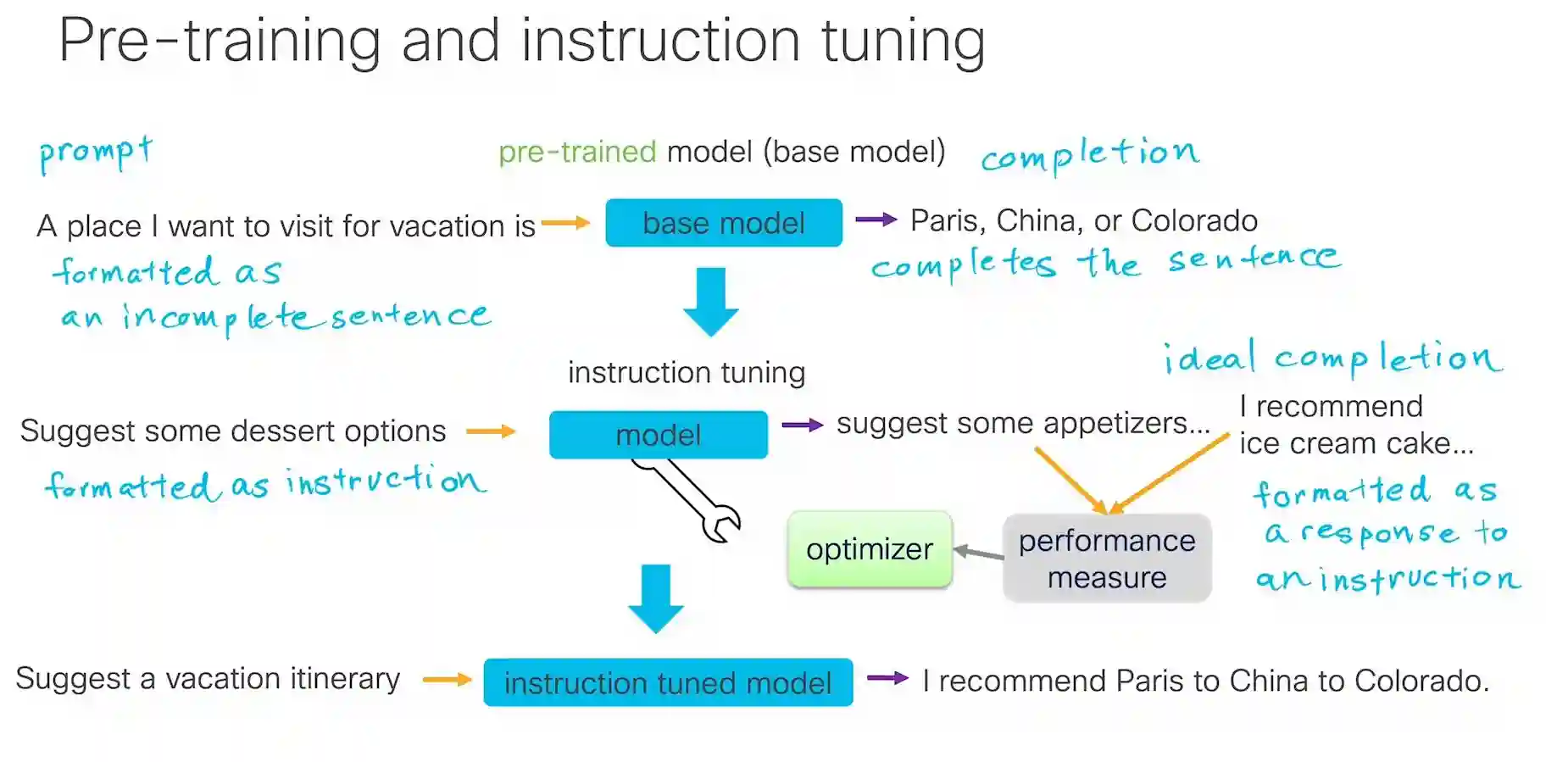
Highly simplified - GPT: Generative Pre-trained Transformer
Generative: output new sequences of text
Pre-trained: foundation model
Transformer: neural network architecture sequence
Part 2
-
Compression: Quantization→ Stores in a smaller amount of space, by working on the bits itself(! #TODO Needs clarification, maybe a deeper course).
parameters(weights) 32 bits→ 16 bits→ 8 bits - Compression: Distillation→ Make the larger model teach a smaller model to produce outputs just like the original models.
- Models have parameters and in case of neural networks it called weights. These parameters store learning and knowledge when it's trained with data.
- Compression: Pruning→ You can remove parameters that are not that important.
- CPU: runs the computer. Delegates math operation tasks to GPU
- GPU: math operations in parallel. → graphics, video games, machine learning→ training and inferences.
- Retrieval Augmented Generation: Why?
Models hallucinates.
Sometimes companies want domain specific information which LLM won't be able to give the information and you can't give the model all the documents you have as it has a context length.
There is a need to find relevant documents and a retrieve the relevant parts of the document to answer these questions. -
RAG: How?
You have LLM and Vector Database(Long list of number).
LLM first goes to vector database and does a similarity search.
vector database finds chunks of text for retrieved text.
this text is sent back to the LLM. - Grounding the model: Retrieving information that can be considered a source of truth to help a model answer a question truthfully.
- Fine-tuning: Training a model on additional data to give it knowledge on specific data or changing it's behaviour in certain ways.
-
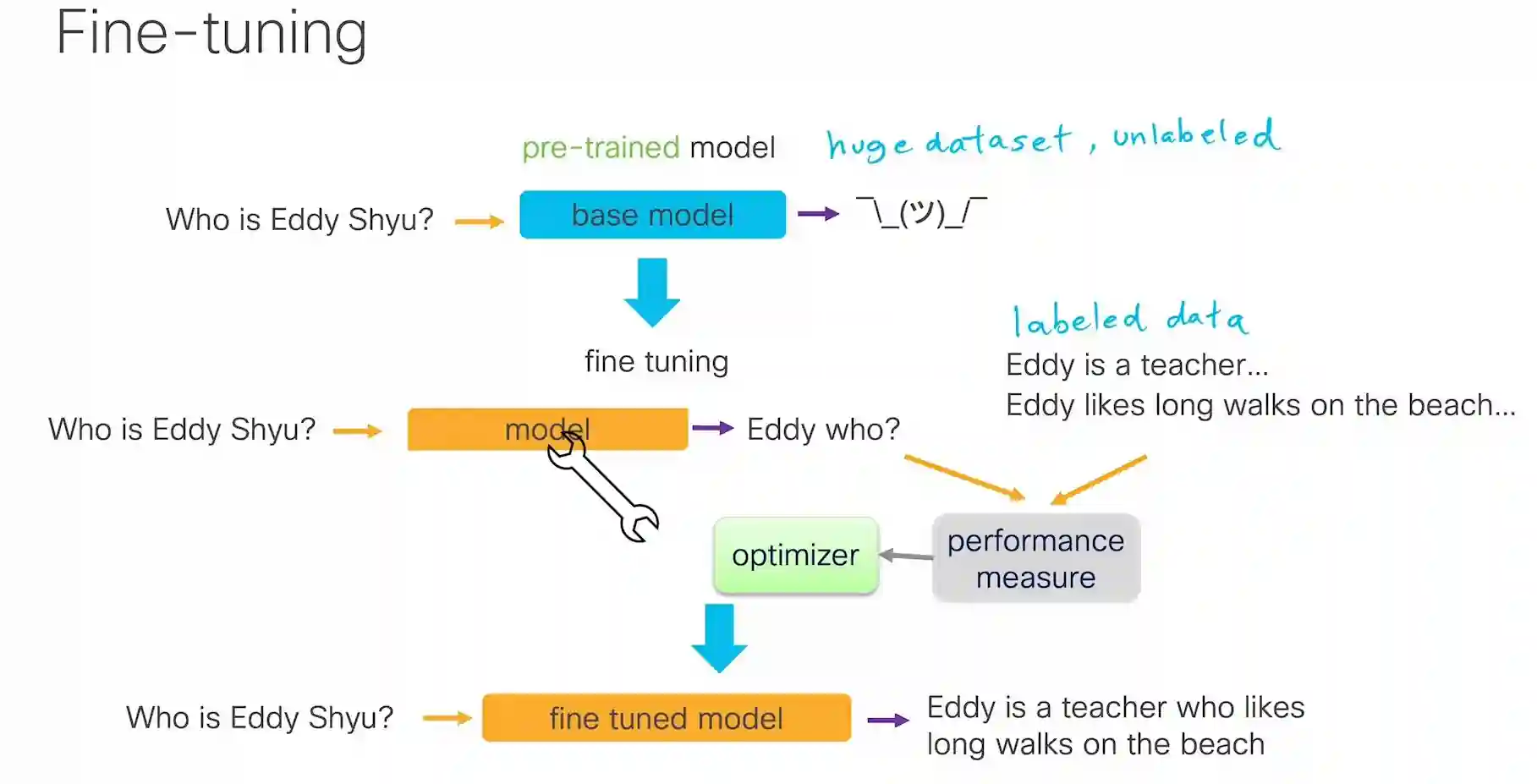
Simplified - First domain specific answer is not given then it's given a fine tuning process with curated labelled data.
Then it tries to answer correctly but you give the correct acceptable output and performance is optimized and a finer tuned model is created which you can use. - Agents: Making decisions and taking actions independently.
Agents are LLMs that are wrapped in additional code. - Agents usages:
reflection, tool use(taking actions), planning, collaboration(multi-AI agents).
Skill Stacking
- Instead of being king of one, be jack of all trades.
- Instead of trying to be really really good at one skill or be good at a lot of things.
- Creative and Technical: Try to have both type of hobbies and day job.
Open Ended Project
-
Prototype what you want to show by going through the steps (on your phone or computer).

Take notes of the sequence of steps that you went through when you prototyped the process.

You may also wish to create some slides to give a mental picture of some process or idea.

Script
Based on what you expect the viewer to see, you can write a draft of what you want to say for each part of the video.

It will be easier to film (record your computer screen or phone screen) without recording what you want to say. You can record your audio separately.

We recommend recording small sections and saving separate videos for each section.

Record audio
After reviewing your filmed screen recordings, you can review your script and record your narration.

Edit
First edit the visuals, then edit your voice narration. You can then adjust the visuals and narration to make them line up. For instance, you may want to extend a video clip (freeze the last frame and extend it) to give time for the narration to finish. Or you may decide to re-record or edit the audio based on how you edited the video.

Add music
You can add music to your video within apps such as TikTok, Instagram.

You can share your video in the Discord channel, or post on social media.

If you’d like for the educational team to see and comment/like/reshare, you can add any of these hashtags: #memyselfandai #pieceofcake

Or you can tag any of the following usernames:

LinkedIn

@cisco networking academy