Since configuration prices keeps varying, please use common sense to decide what you should or shouldn't get.
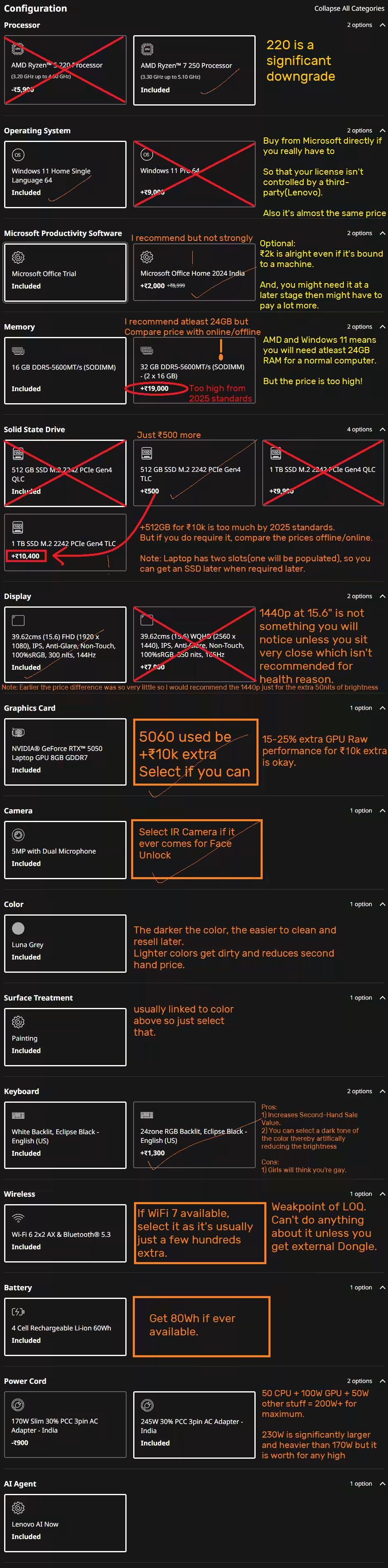
Configuration
In current PC crisis market
Specs to select when not in a PC crisis market
If you're in India and are going for all the extra savings and have some extra money to spare for RAM/SSD upgrades(Get the 5060 upgrade before looking into this), in that case:
The day it got listed on 7th Aug 2025 on Lenovo India, this was the configuration that made the most sense:
Microsoft Productivity Software: Microsoft Office Home 2024 Indiaselected upgrade
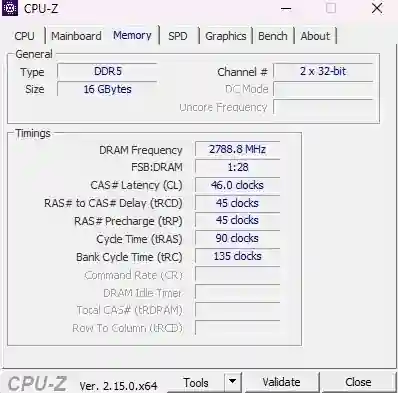
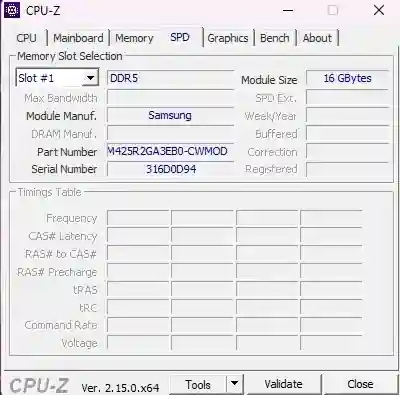
Memory : 16 GB DDR5-5600MT/s (SODIMM) (Upgrading to 24GB was too costly)
Solid State Drive: 512 GB SSD M.2 2242 PCIe Gen4 TLC (Cost of making it 1TB was too much)
Display: 39.62cms (15.6) FHD (1920 x 1080), IPS, Anti-Glare, Non-Touch, 100%sRGB, 300 nits, 144Hz (You can select the better display if you have the money)
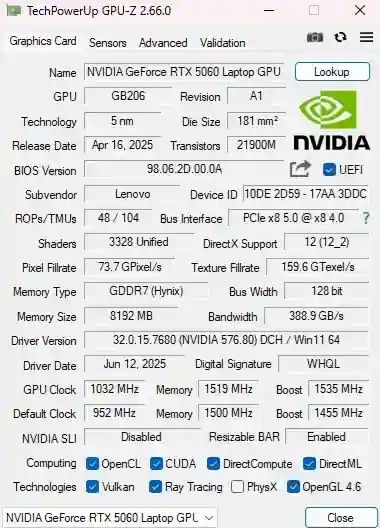
Graphic Card: NVIDIA® GeForce RTX™ 5060 Laptop GPU 8GB GDDR7selected upgrade
Battery: 4 Cell Rechargeable Li-ion 60Wh (If you see a better one, grab it. There are chances of an 80Whr coming but no guarantees)
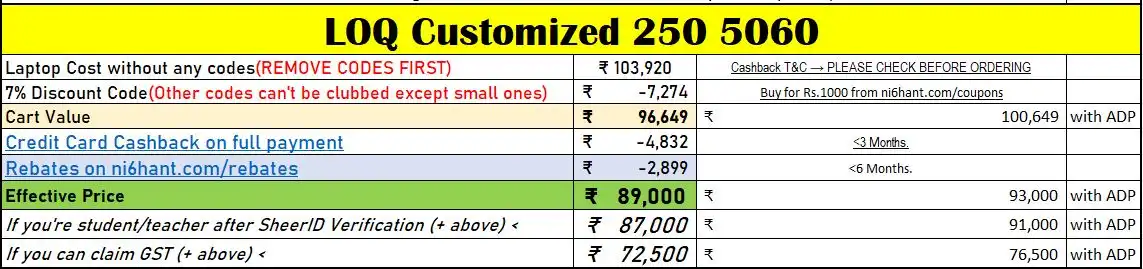
Extra Savings if buying from Lenovo.com in India only
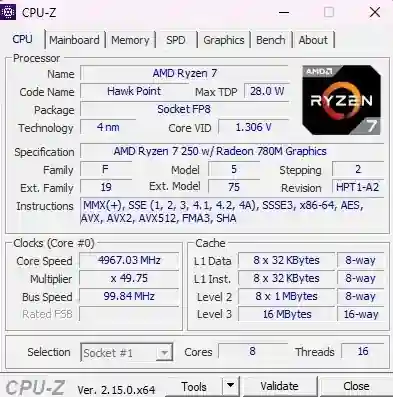
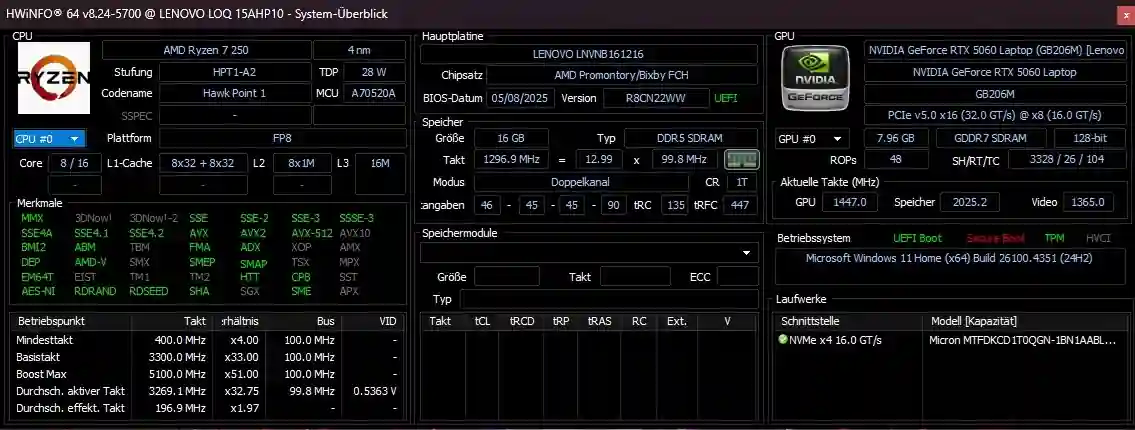
The 250 is a rebranded 8840U and NOT THE 8845HS as I have wrote.
I expected the CPU to be a higher wattage before it was launched so assumed this CPU will also need to go as high as 80W to get the 16k R23 score but it manages it with much less TDP of just 53W.
This is a far better CPU than I expected. Will update site and pinned comment accordingly. https://www.notebookcheck.net/AMD-Ryzen-7-250-Processor-Benchmarks-and-Specs.945901.0.html
Thanks to @ayush_mahajan for letting us know about this. And no, it's not a downgrade, it remains the same performance as the 7840HS/8845HS with 80W i.e. 16k R23 Scores. Of course, once there are enough of these laptops in people's hand, the truth will come out naturally.
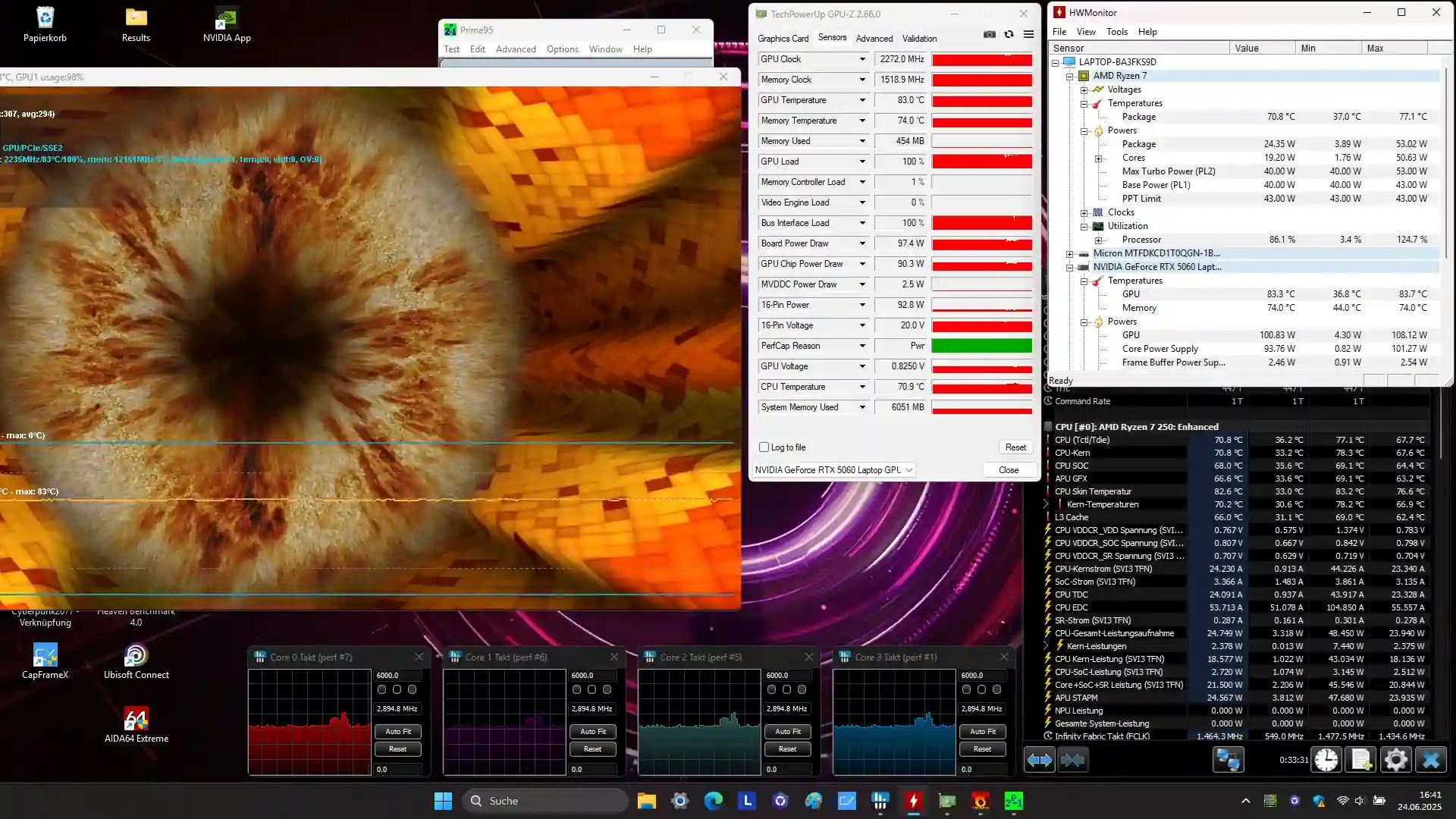
Lenovo shows 100W GPU but the GPU boosts to higher than that normally and I have seen it go upto 108W normally. Regardleess of what it says, the benchamrks show that it's the same score of all the 115W 5060 anywyas.
Remember, 5000 series are more efficient than 4000 series.
Summary
Two sided vents means frequent cleaning of the laptop in countries like India.
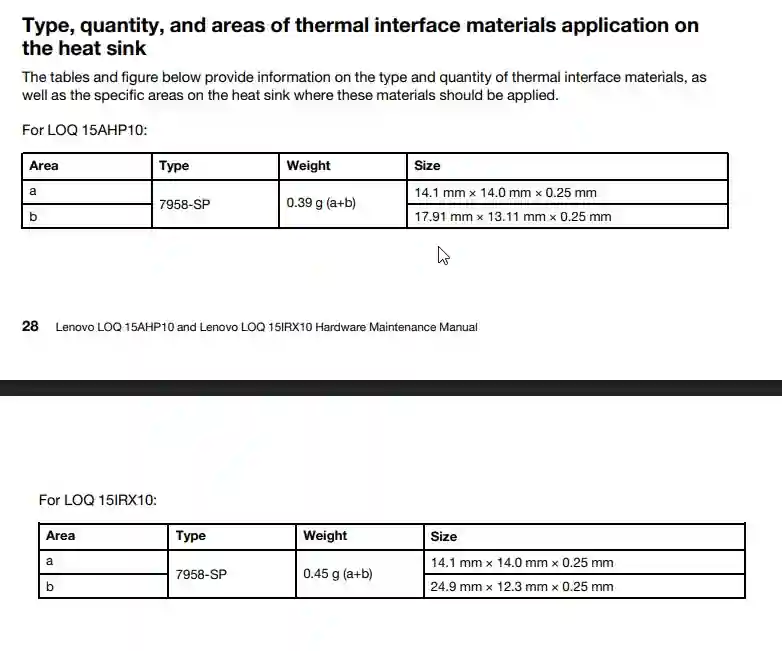
No need to change thermal paste but fans needs to be cleaned.
Great CPU and GPU Perforamnce for the price and great thermals on the CPU and GPU even though the body and charger will get warm.
No compromises on even the 144Hz display: Mux Switch, Advanced Optimus, Gsync.
245W charger bundled even with the 5050 variant so no worries about long term battery drop or lower performance due to smaller power adapter.
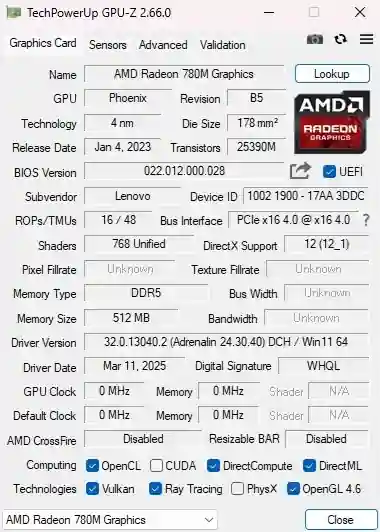
iGPU is the famous Radeon 780m which is basically a 2050 performance or a low powered 3050.
6hrs battery lasted: Quiet Mode: 60fps: Youtube 1.5hrs and then Offline Movies watching with 46% brightness.AMD CPU so better battery life although more tests are needed to confirm this.
To Confirm Later
6hrs battery lasted: Quiet Mode: 60fps: Youtube 1.5hrs and then Offline Movies watching with 46% brightness.
Battery Life should be higher than what Notebookcheck reported.
Lenovo shows 100W GPU but the GPU boosts to higher than that normally and I have seen it go upto 108W normally. Regardleess of what it says, the benchamrks show that it's the same score of all the 115W 5060 anywyas.
Remember, 5000 series are more efficient than 4000 series.
Pros/Cons
Pros
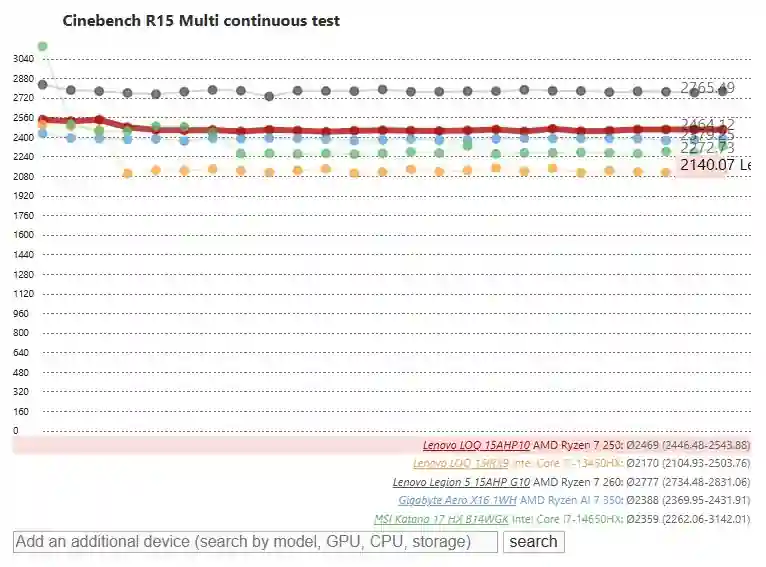
CPU gives consistent performance(only 4% drop) in long workloads unlike Intel HX CPUs which easily drop 20-30% in only a few minutes
Note: Performance under loads for a long time is better than a 13650HX and also beats some like the MSI Katana's 14650HX CPUs but usually stays below that. The 350 CPU is just 10% faster than this.
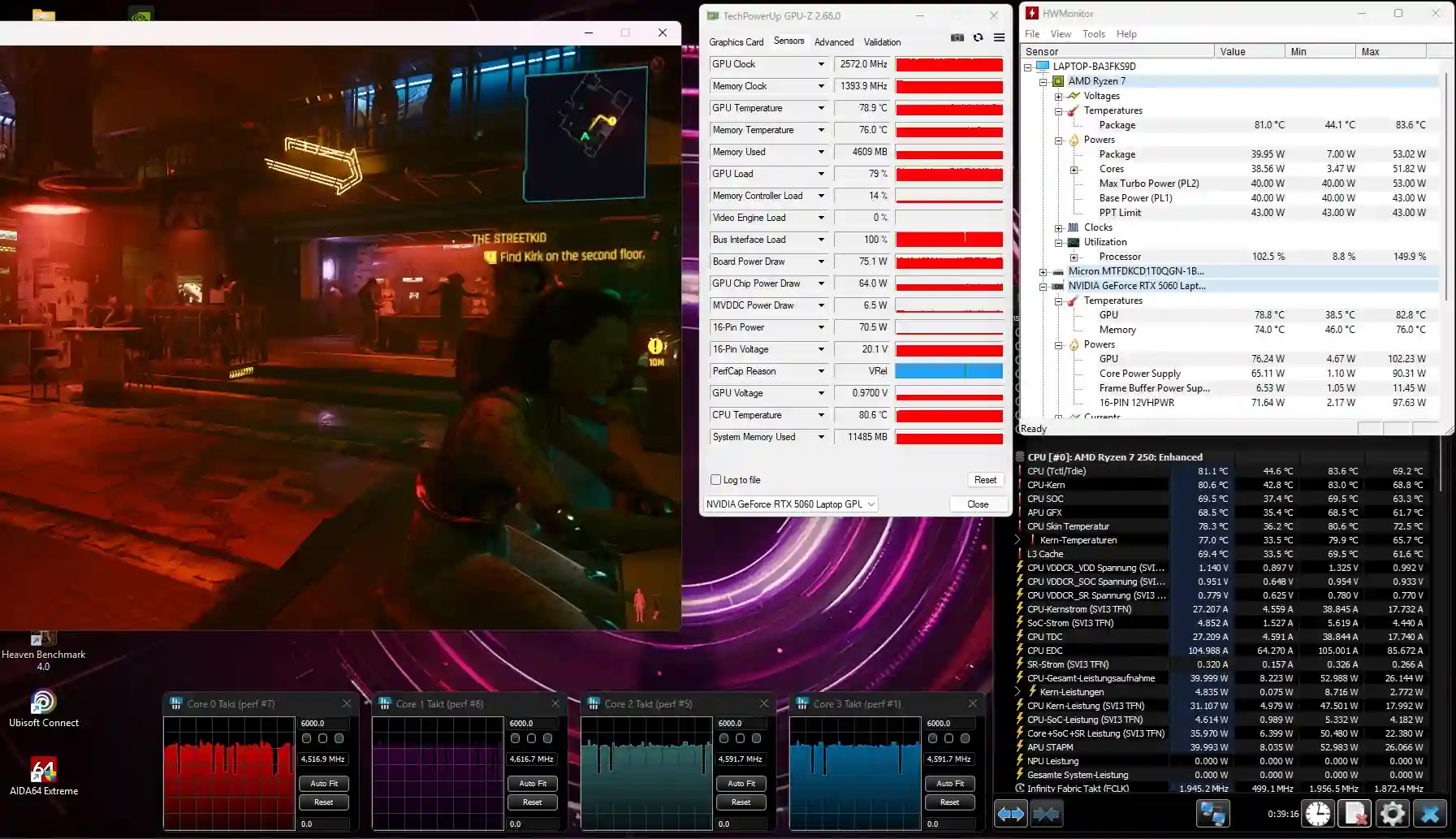
GPU Stress Test: GPU only heated upto 81°C.
CPU Stress Test: CPU only heated upto 71°C.
No GPU Throttling in long term gaming tests.
Two Full Size SSDs slot(2280)
Two RAM Slots(One populated)
The 144Hz display: 99% sRGB so good color accuracy
The laptop comes with PTM thermal paste so you will not need to change the thermal paste for many years.
Mux Switch, Gsync and Advanced Optimus so less tearing during lower fps games and no need to restart laptop while switching GPUs and slightly better performance.
Neutral
Neutral-Good
Good keyboard.
The 144Hz display is 100% sRGB so enough for most people color wise.
The 144Hz display: No PWM so no headaches on using it for a long time.
The 144Hz display: Low Blacks levels so good contrast ratios
Display is matte finish so no reflection.
Plenty of Ports
System only uses 172W on maximum so any adapter higher than this should be enough
Mux Switch so can disable dedicated GPU for better battery or disable iGPU for better performance.
Neutral-Doesn't matter
Same body as older LOQs. All plastic but solid heavy plastic.
No Thunderbolt given it's a budget laptop.
The 144Hz display: Okay okay response time. Neither too good, nor too bad.
Good enough keyboard
144Hz Display: Okay response times
Great SSD speeds but the speeds vary by a lot
8GB VRAM has already started to show it's limitations in newer games like Indiana Jones so don't expect an 8GB VRAM card to play newer titles.
Note: PS5 launched in 2020, 5 years ago while writing this, and back then it launched with 16GB VRAM. And game developers always target Consoles first and their VRAM Capacity first. It's time for the newer generation of consoles right now and games like GTA will be paid up by Nvidia and AMD to make sure the newer titles only run on the newest generatoin of hardware so that they sell. So, in short, don't expect GTA 6 to run on it.
Neutral-Bad
No Left Side ports to keep a few cables out of the way
Terrible Webcam
Charger weighs 600gms.
Just usable touchpad
Not for color accurate work due 69% AdobeRGB and 67% DCI-P3
Maybe Bug: Fans keep ramping up in performance mode but not in balance mode under low load.
Cons
The AMD 250 CPU is a rebadged 8840UNot 8845HS as I wrongly said in the video which was a rebadged 7840U. There is nothign bad about it just the fact that it's the same old CPU in the same old price range.
The "new" 250 CPU is a repackaged 8845HS which was a repackaged 7840HS - which is an excellent power-efficient CPU but you arent' gaining much in terms of CPU perforamnce if you're spending more than a laptop with 13650HX (Even 13450HX comes close to this in some laptops). Check the excel sheet for performance comaprision.
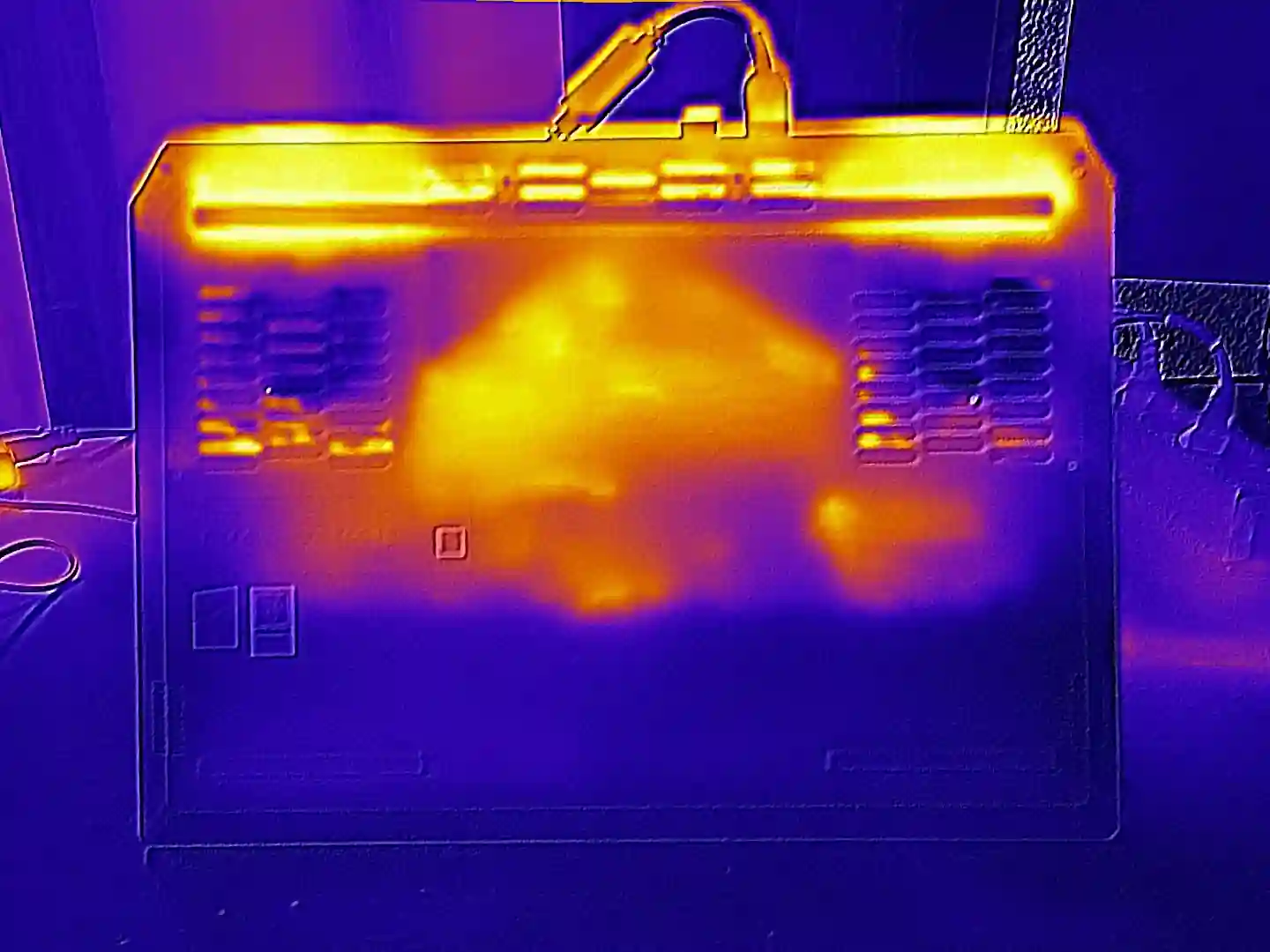
The problem with all but the first LOQ is only two sided vents on the back of the laptop. There are no vents on the sides of the laptop.
This is a huge problem in places like India where there is a lot of dust in the air.
This means that the laptop fans will get dirty quicker and you will have to keep cleaning the laptop fans every few months to keep the temperatures under control.
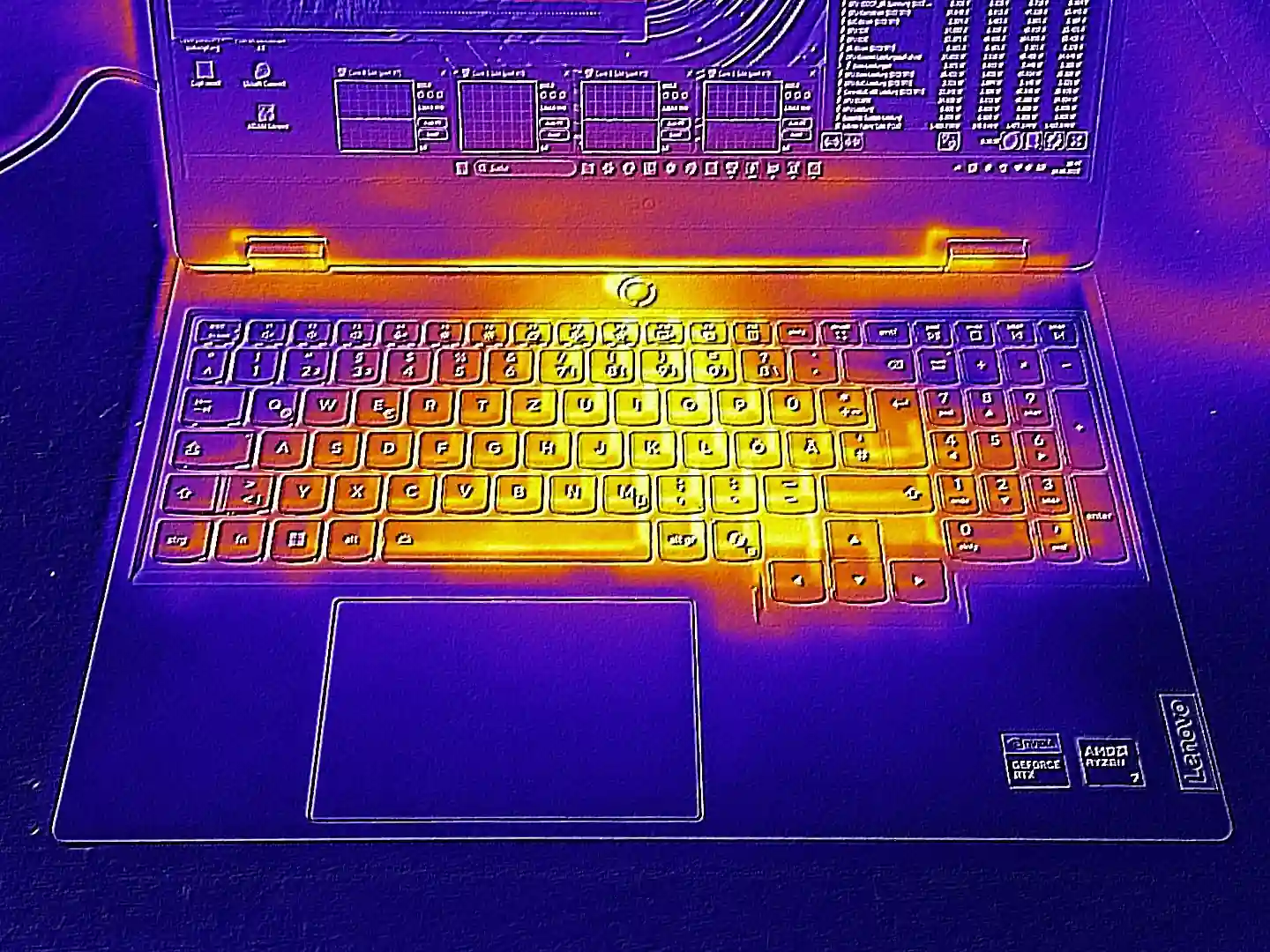
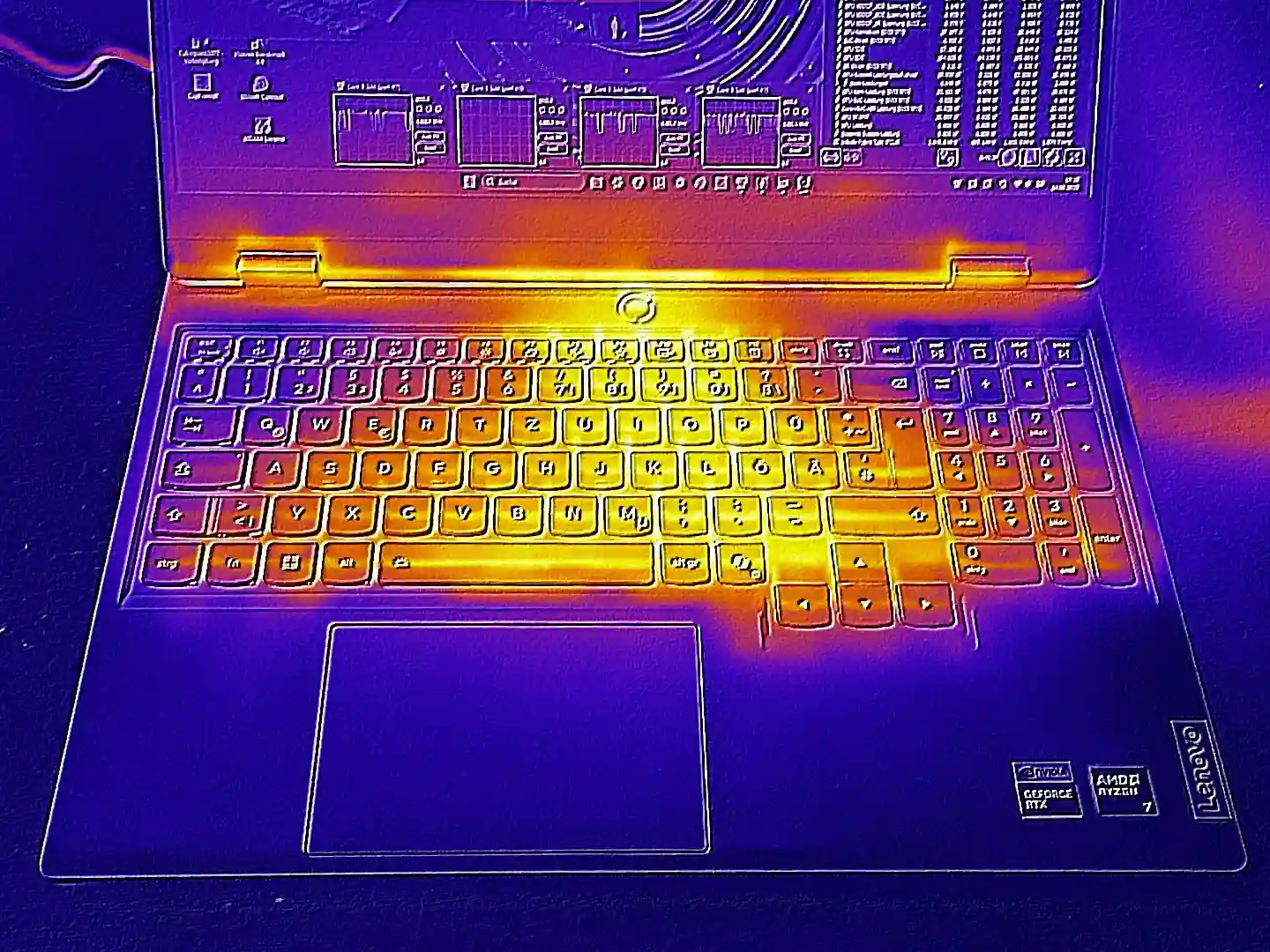
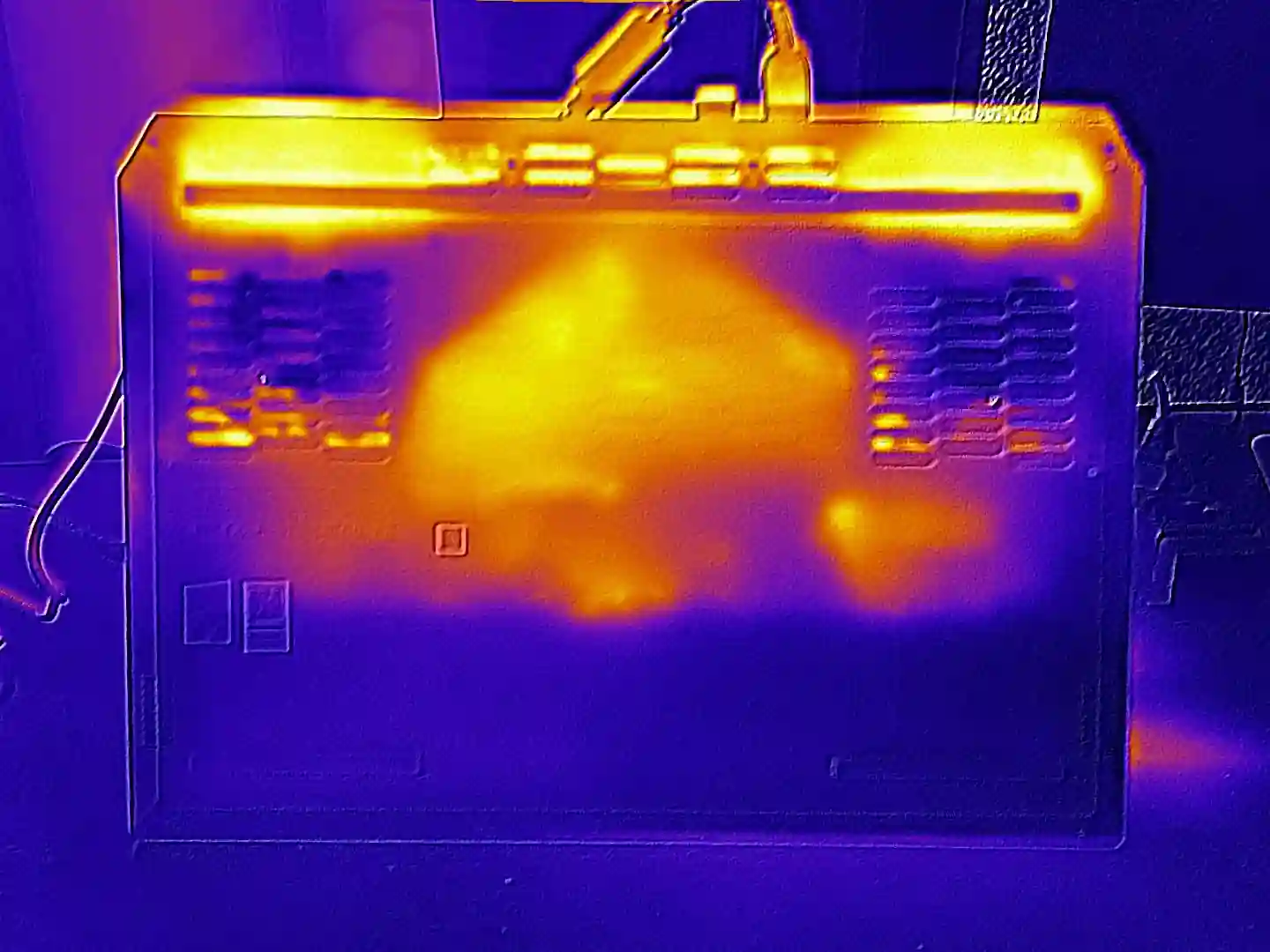
The whole laptop body(not CPU GPU) heats up 10-15°C more than other gaming laptops.
Due to high idle power consumption the laptop won't last as long as one might expect from an AMD. Even in synthetic tests, WiFi surfing only managed 4.5 hours.
The palmrest gets very hot to touch: 43°C
Terrible Speakers.
Worst Wi-Fi Speeds if Realtek WiFi Card
Cautions
There are a few cautions:
Get laptop with three years ADP and ad one more at the end of three year period for peace of mind
The lack of four sided vents in the newer LOQs has always been my personal point of worry. Due to lower vents to output the air if the laptop is used in a dusty environemnt(all of India) it will need cleaning of the fans regularly without needing to take out the fan moduel so no thermal paste change necessary.
Note: This was probably the reaosn of many LOQ Intel HX Laptops dying as they kept heating a lot and due to a lack of a safety system to turn the system off in a high power mode, about 3% of them died in 2024.
Laptop comes pre-applied with PTM Thermal Paste, good thermal compounds for the VRMs and other components. Therefore the thermal pastes on the CPU and GPU will NOT NEED REPLACING FOR A GOOD 2-3 YEARS but the vents needs to be cleaned regularly especially if you live in a dusty place.
Even though laptop says PD charging of upto 100W I have seen that such PD chargers don't work with gaming laptops unless they are sleeping which is no use to anyone really.
Don't buy this laptop thinking DLSS will save low frames.. DLSS works best when you already have a high frame rate as Hardware Unboxed have pointed out multiple times.
Personally, I find DLSS and any such upscaling methods to be absolutely s#!t and fu**ing pathetic to look at and I always turn it off and lower graphics settings or resolution instead.
This is without taking into the account of the motion sickness you will feel because of input latency being higher than the frame latency. It's a wierdly sickening feeling.
All in all, there are good reasons to turn off any DLSS effects and you might end up doing so please stick to benchmarks without DLSS.
These are the points I am yet to find a concrete answer to:
After adding another 16GB Ram and with this laptop, the area under the space bar gets very hot to touch and brother had to remove the ram shield key to reduce it to a nominal temperature however it increased the temperatures of the CPU.
To confirm the wattage of this CPU in long term multi-core test to determine if it's more efficient than the popular 7840HS
5000 series Nvidia GPU have had some graphics driver issue/ROP issue. I have not looked into it due to lack of data on laptop side but the stability of these GPUs are in question. I will update this line as soon as enough data is available.
There is a very good chance that driver update should fix it but if you want to remain absolutely safe, wait a few months when real users get the laptop and not just youtubers.
6hrs battery lasted: Quiet Mode: 60fps: Youtube 1.5hrs and then Offline Movies watching with 46% brightness. Will have to confirm this but I believe the battery can last longer on this machine if proper testing is done considering it's the same 7840HS CPU technically.



 concrete answer to:
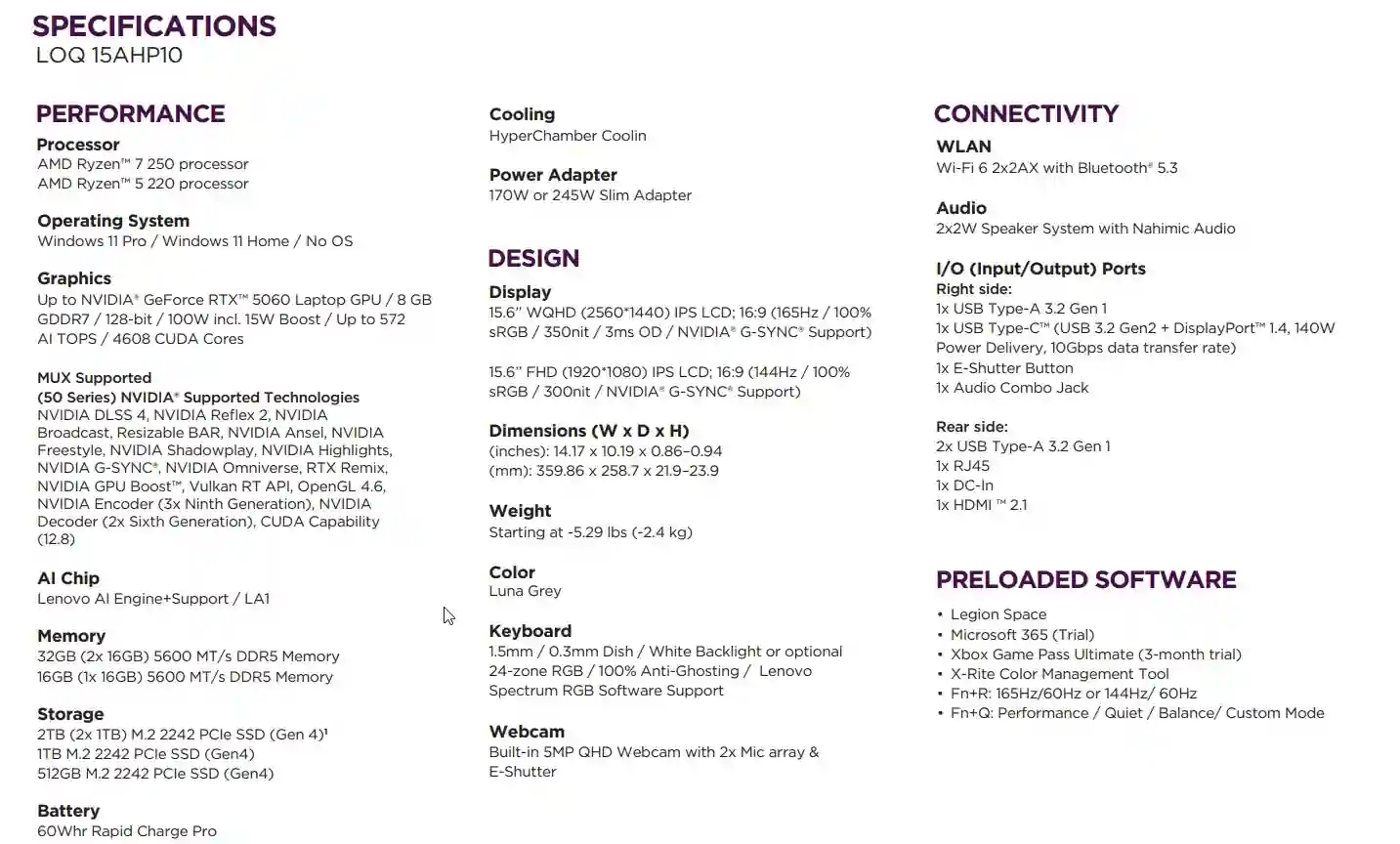 These specs are NOT confirmed for India.